
2 Pre-registration and VIN
1 Vehicle records
1-1 Finding vehicle records
When a vehicle is presented for pre-registration, the vehicle must be inspected and the chassis or frame number, or vehicle identification number (VIN), must be located on the vehicle.
(Table 4-1-1 describes permitted VIN locations).
The entry certifier must then check to see if a record of the vehicle already exists in the LANDATA computer system. If a vehicle record does exist, the entry certifier must ensure that the record is correct. If no record exists, and the vehicle is a used import, the owner must apply to NZTA for a border check exemption before the entry certifier can create a record in LANDATA for that vehicle.
If assistance is required in determining which is the correct record to use, or if a record cannot be found when there should be one, contact NZTA on 0800 804 580.
- Vehicles registered in New Zealand prior to 1996 or vehicles that have undergone a border inspection only will often be recorded with a vehicle identifier that does not match the vehicle. In such cases, care must be taken to use the search procedures to find these vehicle records.
- Always ensure that the correct VIN, chassis or frame number has been keyed.
1 VIN, chassis and frame numbers
To have a vehicle record, a vehicle must have a vehicle identifier. This will be a vehicle identification number (VIN), or a chassis or frame number.
A VIN is a series of digits and letters structured so that every vehicle has a unique identifying number, according to an international standard (ISO 3779). The VIN always contains exactly 17 characters and never contains the letters O, Q or I.
1.1 Recording vehicle identifiers
Spaces should never be keyed for VIN, chassis or frame numbers. Some may exist in historical records; these should be corrected wherever possible.
A VIN may physically have punctuation characters but these must never be recorded or keyed.
A dash may be recorded in a frame or chassis number.
1.2 Vehicles with two identifiers
Occasionally, a vehicle may be presented with two vehicle identifiers (ie two VINs, or a VIN and a chassis number).
For example:
A European vehicle sourced from the United States of America (US) may have two VINs assigned if the original European VIN does not meet US standards.
A vehicle previously registered in Japan may have a Japanese chassis number assigned in addition to the original manufacturer’s identifier.
In such cases, an entry certifier must note what the identifiers are and must explain why there are two identifiers in the Notes screen.
1.2.1 Recording a vehicle with a VIN and a chassis number
Enter:
- the VIN in the VIN field, and
- the chassis number in the chassis number field.
Important: The chassis number can only be keyed after all the attributes have been recorded using the VIN number as the identifier.
1.2.2 Recording a vehicle with two legally affixed VINs
Record:
- the VIN from the previous registration record in the VIN field, and
- the other VIN in the chassis number field.
In cases where this may cause confusion (eg the previous registration record VIN is not as visible as the other VIN, or would not be used in a manufacturer’s recall), the opposite may be recorded if approval is given by the Vehicle Certifiers Registers team.
1.3 VIN, chassis or frame number removed or damaged during repair
For all vehicles, if the VIN, chassis or frame number has been damaged or removed during repair >or the vehicle has two identifiers as a result of the repair, an entry certifier must:
1. complete a VIN approval request form (CA01) and attach specific information relating to the repairs. Send it to:
Exemptions and Registers Integrity
NZ Transport Agency
Private Bag 11777
Palmerston North 4442
Email: assessments@nzta.govt.nz
2. verify the VIN or chassis number from other sources (eg the original parts, registration papers, purchase receipts, insurance documentation), and key all details in LANDATA using this number
3. verify that any vehicle identifiers on discarded parts have been erased/destroyed
4. always record an explanation in the notes screen.
1.4 VIN, chassis or frame number not found, or modified/tampered with
For all vehicles, if the VIN, chassis or frame number cannot be located or the identifier that has been located appears to have been modified, removed, tampered with, or appears to be a reproduction, an entry certifier must:
1. complete a VIN approval request form (CA01) and send it to:
Exemptions and Registers Integrity
NZ Transport Agency
Private Bag 11777
Palmerston North 4442
Email: assessments@nzta.govt.nz
2. attempt to find a VIN or chassis number from other sources (eg registration papers, purchase receipts, insurance documentation), and key all details in LANDATA using this number
3. if an identifier still cannot be found, access the VIN screen without entering an identifier. A blank screen will display. All details are to be keyed and a record created for the vehicle
4. always record an explanation in the notes screen
5. do not approve the vehicle for registration until approval is given by Waka Kotahi.
- Used vehicles imported from Japan with a vehicle identifier that has been partially or totally removed cannot be processed for entry into New Zealand unless the vehicle has been re-identified by the Japanese Ministry of Land, Infrastructure and Transport (MLIT) and issued with an authentic export certificate that lists the new identifiers. See Reference material 76 for an example of the method used by the MLIT to re-identify vehicles that have been stolen and recovered.
Reference material 76
1.5 Vehicle matched on the vehicle of interest database
When a vehicle identifier is specified in the LANDATA system, the system also searches against the ‘vehicle of interest’ (VOI) system on the enforcement database to determine whether a vehicle with the same identifier has been reported stolen.
If a match is found on the VIN screen, the following warning message will display, along with the details of the vehicle(s) found: ‘Vehicle identifier matched on external system’.
This message may be displayed even if the vehicle details are not available on the LANDATA database. The warning message is deliberately vague, so it does not raise any suspicion if the vehicle owner or dealer happens to see the message.
1.5.1 What to do if a match is found
If the warning message is displayed, or if there are any doubts regarding a vehicle’s identity, proceed with the VIN allocation without arousing suspicion.
If a ‘Vehicle report’ form (Reference material 54) has not already been submitted for the vehicle, one should be completed and emailed to the NZ Police immediately. If you are unable to email the report immediately, do it as soon as possible. If, for any reason, you are unable to complete a ‘Vehicle report’ form or forward it to the NZ Police, contact NZTA as soon as possible to report the event. Try to note all details that may help identify the vehicle and any person(s) associated with it. Do not place yourself or your colleagues at risk. You should continue with all phases of the certification process, except approving the vehicle for registration and printing the MR2A registration form. In such cases, approval for registration can only be carried out if the vehicle match is removed, or approval is granted by NZTA.
1-2 Selecting a vehicle record
When accessing the VIN screen, LANDATA checks for all records recorded against a VIN, chassis or frame number. This captures multiple vehicles with the same chassis or frame number, and vehicles with multiple records.
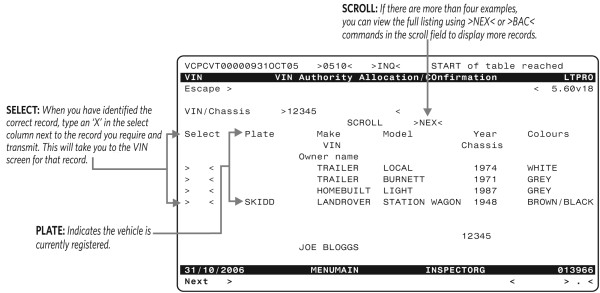
If there are multiple records available for a vehicle identifier, the ‘VIN authority allocation/confirmation’ screen will display with a list of records found for the specified identifier.
See Figure 1-2-1
Spaces in chassis or frame numbers
When transmitting from the escape field, the system will only read as far as the next space (eg if ‘VIN GC5 123456’ is keyed, LANDATA will only read ‘VIN GC5’. The correct record will not display).
Some older records have a space in the chassis or frame number. For these vehicles:
1. type >VIN< in the escape field and transmit
2. a blank VSPCV screen will display
3. enter the chassis or frame number with the space in the VIN/chassis field and transmit
4. LANDATA will recognise the complete number as it will read the whole number between the delimiters (> <).
1 Used vehicles
See Table 1-2-1.
2 Vehicles undergoing re-registration
In 1986 the motor vehicle register (MVR) was computerised. This means only paper records will exist for most vehicles registered in New Zealand prior to 1986. A record will exist in LANDATA for most vehicles on the road in New Zealand from 1986 onwards, although the chassis number is recorded incorrectly in a number of cases.
In March 1994 LANDATA was introduced. However, its use was limited to assigning VINs to vehicles and recording entry certification. Vehicles were still registered separately on the MVR system. Duplicate records still exist in LANDATA (the VIN and the MVR record), although in most cases the records have been merged. In October 1995, the MVR was copied onto LANDATA and it was fully phased out by the beginning of 1996. Therefore, whether or not a vehicle record exists on LANDATA will depend on when it was last registered. If you suspect a vehicle record should be on LANDATA but you cannot find one, fax the details to Vehicle Certifiers Registers on 06 953 6282 and request a LANDATA search.
See Table 1-2-2.
2.1 If a vehicle record is found but the chassis field is blank
The record will not be accessible from the VIN screen.
Contact the Transport Agency on 0800 804 580 or fax the Commercial Licencing Team, Vehicle Certifier Administration on 06 953 6282 for assistance.
3 New and scratch-built vehicles
New and scratch-built vehicles may have been entered into LANDATA by another entry certifier. In this case, the existing record must be used.
If the warning message ‘Warning VIN does not decode – Contact TRC 0800 804 580’ displays, do not continue until the VIN has been decoded.
The Transport Agency will attempt to decode the VIN from their sources. If this is not possible, the vehicle owner/importer must provide decode data.
If no record exists, a record must be created using a blank VIN screen.
A scratch-built vehicle must not be recorded using the existing record of a donor vehicle.
4 Permanent registration of a temporary import
A temporarily imported vehicle presented to an entry certifier for permanent registration is required to go through the full certification process.
- Use a border check record for certification. If there is no border check record, the applicant must apply for a border check exemption.
- Temporary imports can be identified on the TRANLOG and VSPLOG screens by the transaction 'Type' of MR2C.
5 Vehicles registered using an MR2B Application for registration of a VIN exempt motor vehicle
These records cannot be used and do not provide proof of previous NZ registration. These records can be identified using the TRANLOG or VSPLOG screen, 'Type' will be MR2B.
6 Vehicles registered in New Zealand, exported, then re-imported
Use the previous NZ registration record not the border check record. Certification requirements are for a re-registration. Requirements such as Clean Car will not apply.
Table 1-2-1
|
Step |
Action |
|||
|---|---|---|---|---|
1 |
Type >VIN< in the escape field and transmit The ‘VIN authority allocation/confirmation’ screen displays |
|||
2 |
Does the vehicle have an identifier? |
NO |
Transmit A blank ‘VIN allocation’ screen displays Continue from Pre-registration and VIN 2 – Vehicle attributes) |
|
|
YES |
Type the vehicle identifier in the VIN/chassis field and transmit LANDATA will search for a vehicle record for the identifier entered Note : If the identifier has 17 characters (excluding punctuation characters) and does not contain the letters I, O or Q, it is likely to be an ISO VIN. In this case, type the identifier without punctuation characters. If the identifier does not appear to be an ISO VIN, type the punctuation characters but not spaces |
|||
3 |
Is a vehicle found to match the identifier? |
NO |
A blank ‘VIN allocation’ screen displays If the identifier is a valid VIN, this will display in the VIN field. If not, it will display in the chassis number field Used vehicles imported before 1 March 1999 were not required to undergo a border check, so there will not be a vehicle record available on LANDATA. The vehicle owner must supply a biosecurity document and New Zealand Customs entry documents to prove the date of entry into New Zealand Continue from step 4 Note: If the vehicle had a previous plate, a query can be completed on the PHIS screen to show whether the recorded identifier is different. Refer to Pre-registration and VIN 5-3 for procedures |
|
|
YES |
Only one vehicle is found |
The ‘VIN allocation’ screen displays with the vehicle details Continue from step 6 |
||
|
More than one vehicle is found |
The ‘specify vehicle’ screen displays a list of vehicle records with the specified identifier The screen displays four records at a time Enter navigation commands in the scroll field to move between records as required Refer to Table 1-2-2. Navigation commands in the Introduction of this manual Continue from step 5 |
|||
4 |
Have you entered the correct identifier? |
YES |
Continue from step 7 |
|
|
NO |
Type >R< in the escape field and transmit The previous screen will display Type the correct vehicle identifier and transmit Continue from step 3 |
|||
5 |
Is the correct vehicle record displayed? |
YES |
Type >X< in the select field next to the correct record and transmit The ‘VIN authority allocation/confirmation’ screen displays the details of the selected vehicle Continue from step 6 |
|
|
NO |
Enter the correct VIN/chassis number and continue from step 3 |
|||
6 |
Are the displayed details correct? |
YES |
Continue from step 10 |
|
|
NO |
Enter the correct VIN/chassis number and continue from step 3 |
|||
7 |
Is a border check date displayed? |
YES |
Continue from step 10 |
|
|
NO |
Continue from step 8 |
|||
8 |
Was the vehicle imported into New Zealand before |
YES |
Continue from step 9 |
|
|
NO |
Type >VSEARCH< in the escape field and transmit to search for the border check record Refer to Pre-registration and VIN 5-4 for procedures |
|||
9 |
Is documentation proving the vehicle was imported before 1 March 1999 provided? |
YES |
Type the importation date in the border check field and continue from step 10 |
|
|
NO |
Do not continue Advise the vehicle owner to obtain the necessary documentation Type >C< in the escape field and transmit to cancel the transaction |
|||
10 |
Are there any notes to view? |
YES |
Type >notes< in the escape field and transmit Refer to the LATIS manual for procedures on viewing notes |
|
|
NO |
Enter the vehicle attributes Refer to Pre-registration and VIN 2 - Vehicle attributes |
|||
11 |
Type >VIN< in the escape field and transmit The ‘VIN authority allocation/confirmation’ screen displays |
|||
12 |
Do not enter any details in the VIN/chassis field. Transmit A blank ‘VIN authority allocation/confirmation’ screen displays Enter the vehicle attributes Refer to Pre-registration and VIN 2 – Vehicle attributes |
|||
13 |
If this message displays |
Then … |
||
|
Valid VIN entered |
The 17-character VIN is decodable Proceed with VIN assignment Refer to Pre-registration and VIN 3-1 |
|||
|
Chassis number entered |
A chassis number has been entered Proceed with VIN assignment Refer to Pre-registration and VIN 3-1 |
|||
|
Chassis number entered Warning: VIN does not decode – Contact TRC on 0800 804 580 |
The 17 character identifier cannot be decoded Do not proceed with the VIN allocation until the identifier is decoded. Contact the Transport Agency who will attempt to decode the VIN from their sources. If this fails, inform the vehicle owner that they are legally required to provide sufficient decode data under Land Transport Rule: Vehicle Standards Compliance 2002 |
|||
|
Vehicle identifier matched on external system |
A match has been found on the vehicle of interest (VOI) database Proceed with the VIN assignment without causing suspicion Refer to Pre-registration and VIN 3-1 |
|||
Table 1-2-2
|
Step |
Action |
||
|---|---|---|---|
1 |
Type >VIN (vehicle identifier)< in the escape field and transmit The ‘VIN authority allocation/confirmation’ screen displays |
||
2 |
Is the correct vehicle record displayed? |
YES |
Update the vehicle details Refer to Pre-registration and VIN 2 - Vehicle attributes |
|
NO |
Continue from step 3 |
||
3 |
Are you satisfied that no record exists? |
YES |
Use a blank ‘VIN authority allocation/confirmation’ screen to enter the vehicle attributes Refer to Pre-registration and VIN 2 - Vehicle attributes |
|
NO |
Contact the Vehicle Certifiers Registers team for assistance |
||
Figure 1-2-1. Example ‘VIN authority allocation/confirmation’ screen
Page amended 10 April 2025 (see amendment details).
2 Vehicle attributes
2-1 Recording vehicle attributes
1 Requirement to capture vehicle attributes
A number of vehicle attributes are required to be maintained by the LANDATA system.
For new vehicles imported by the manufacturer’s representative, this information is supplied by the manufacturer.
For vehicles processed by entry certifiers, the required attributes must be captured as part of the VIN allocation process. Before a VIN can be assigned to a vehicle, details about the vehicle must be recorded and captured in LANDATA. A standard worksheet is used to record the required attributes. The entry certifier must examine the vehicle and record the details on this worksheet before entering the vehicle details into LANDATA. Details must not be recorded or entered prior to the inspection. This worksheet is an important document, as it also serves as an audit trail of the vehicles processed.
2 Mandatory and optional attributes
Vehicle attributes can be classified as mandatory, optional or not applicable depending on the type of vehicle.
Table 2-2-1 details which vehicle attributes are mandatory, optional or not applicable for each vehicle type.
All mandatory vehicle attributes must be recorded on the vehicle attribute worksheet before proceeding, with the exception of: test cycle, fuel consumption values, CO2 values and battery information where it is provided on the fuel consumption statement.
Table 2-2-1. Vehicle attribute requirements by vehicle type
|
Key |
|
|---|---|
|
M |
Mandatory |
|
O |
Optional |
|
N |
Not applicable |
|
1 |
Mandatory for used imports |
|
2 |
Mandatory for re-registrations |
|
3 |
Mandatory for used imports when previous country of registration is Japan |
|
4 |
Mandatory before an MR2A can be issued, but not required for VIN assignment |
|
5 |
Mandatory for used imports when vehicle year is after 1989 and engine type is 1 or 2 |
|
6 |
Mandatory for used imports when vehicle year is after 1999, and engine type is 1 or 2 |
| 7 | Mandatory if air conditioner fitted is Y |
| 8 | Mandatory for classes MA, MB, MC, MD1, MD2, and NA. Optional for other powered vehicles |
| 9 | Optional if test cycle is provided, cannot be entered in any other case |
| 10 | Mandatory for vehicles with powered by petrol, diesel, LPG or CNG. (Fuel types: 1, 2, 3, 4, 7, 8, 9, 10, 11, 12, 13 and 14. See 11-2 Exhaust emissions Summary of legislation for more detail). |
| 11 | Optional for Fuel Types 05, 11, 12, 13, 14, 17 and 18. Cannot be entered for any other fuel types |
| 12 | Mandatory for vehicles with a GVM of 3500kg or less, before the Compliance Ind can be set to Yes |
|
Attributes |
Vehicle type |
||||||||||||
|---|---|---|---|---|---|---|---|---|---|---|---|---|---|
|
01 |
02 |
03 |
04 |
05 |
06 |
07 |
08 |
09 |
10 |
11 |
12 |
13 |
|
|
Vehicle type |
M |
M |
M |
M |
M |
M |
M |
M |
M |
M |
M |
M |
M |
|
Registration indicator |
M |
M |
M |
M |
M |
M |
M |
M |
M |
M |
M |
M |
M |
|
Border check date |
1 |
1 |
1 |
1 |
1 |
1 |
1 |
1 |
1 |
1 |
1 |
1 |
1 |
|
Date of 1st NZ reg |
2 |
2 |
2 |
2 |
2 |
2 |
2 |
2 |
2 |
2 |
2 |
2 |
2 |
|
Engine number |
M |
N |
O |
O |
N |
M |
M |
M |
M |
M |
M |
O |
M |
|
Country of previous reg |
1 |
1 |
1 |
1 |
1 |
1 |
1 |
1 |
1 |
1 |
1 |
1 |
1 |
|
Date of 1st reg |
1 |
1 |
1 |
1 |
1 |
1 |
1 |
1 |
1 |
1 |
1 |
1 |
1 |
|
2 |
2 |
2 |
2 |
2 |
2 |
2 |
2 |
2 |
2 |
2 |
2 |
2 |
|
|
No. of seats |
N |
N |
N |
N |
N |
N |
M |
M |
M |
M |
N |
N |
M |
|
Colour – basic |
M |
M |
M |
M |
M |
M |
M |
M |
M |
M |
M |
M |
M |
|
Colour – secondary |
O |
O |
O |
O |
O |
O |
O |
O |
O |
O |
O |
O |
O |
|
Make |
M |
M |
M |
M |
M |
M |
M |
M |
M |
M |
M |
M |
M |
|
Model |
M |
M |
M |
M |
M |
M |
M |
M |
M |
M |
M |
M |
M |
|
Submodel |
O |
O |
O |
O |
O |
O |
O |
O |
O |
O |
O |
O |
O |
|
Industry model code |
3 |
3 |
3 |
3 |
3 |
3 |
3 |
3 |
3 |
3 |
3 |
3 |
3 |
|
Variant |
3 |
3 |
3 |
3 |
3 |
3 |
3 |
3 |
3 |
3 |
3 |
3 |
3 |
|
Vehicle year |
M |
M |
M |
M |
M |
M |
M |
M |
M |
M |
M |
M |
M |
|
Body type |
N |
M |
N |
N |
N |
N |
M |
M |
M |
N |
N |
N |
N |
|
Imported LHD |
M |
M |
M |
M |
M |
M |
M |
M |
M |
M |
M |
M |
M |
|
GVM |
O |
4 |
O |
O |
O |
O |
4 |
4 |
4 |
4 |
O |
O |
4 |
|
CC rating |
M |
N |
M |
M |
N |
M |
M |
M |
M |
M |
M |
M |
M |
|
Engine type |
M |
N |
M |
M |
N |
M |
M |
M |
M |
M |
M |
M |
M |
|
Alternative fuel |
O |
N |
O |
O |
N |
O |
O |
O |
O |
O |
O |
O |
O |
|
Assembly type |
M |
M |
M |
M |
M |
M |
M |
M |
M |
M |
M |
M |
M |
|
Odometer reading |
M |
N |
N |
N |
N |
N |
M |
M |
M |
M |
M |
M |
M |
|
Odometer unit |
M |
N |
N |
N |
N |
N |
M |
M |
M |
M |
M |
M |
M |
|
Class |
N |
N |
O |
O |
N |
O |
O |
O |
O |
O |
N |
N |
O |
|
Number of axles |
N |
M |
N |
N |
N |
N |
N |
M |
M |
M |
N |
N |
M |
|
Country of origin |
M |
M |
M |
M |
M |
M |
M |
M |
M |
M |
M |
M |
M |
|
Test regime |
|||||||||||||
|
FC urban |
|||||||||||||
|
FC extra urban |
|||||||||||||
|
FC combined |
|||||||||||||
|
Test regime |
N |
N |
N |
N |
N |
N |
10 |
10 |
10 |
10 |
N |
N |
10 |
|
Test cycle |
O |
N |
O |
O |
N |
O |
8 |
8 |
8 |
8 |
O |
O |
8 |
|
FC urban |
9 |
N |
9 |
9 |
N |
9 |
9 |
9 |
9 |
9 |
9 |
9 |
9 |
|
FC ext. urban |
9 |
N |
9 |
9 |
N |
9 |
9 |
9 |
9 |
9 |
9 |
9 |
9 |
|
FC low |
9 |
N |
9 |
9 |
N |
9 |
9 |
9 |
9 |
9 |
9 |
9 |
9 |
|
FC medium |
9 |
N |
9 |
9 |
N |
9 |
9 |
9 |
9 |
9 |
9 |
9 |
9 |
|
FC high |
9 |
N |
9 |
9 |
N |
9 |
9 |
9 |
9 |
9 |
9 |
9 |
9 |
|
FC extra-high |
9 |
N |
9 |
9 |
N |
9 |
9 |
9 |
9 |
9 |
9 |
9 |
9 |
|
FC combined |
9 |
N |
9 |
9 |
N |
9 |
9 |
9 |
9 |
9 |
9 |
9 |
9 |
|
CO2 combined CO2 3PWLTP |
9 |
N |
9 |
9 |
N |
9 |
9 |
9 |
9 |
9 |
9 |
9 |
9 |
|
CO2 low |
9 |
N |
9 |
9 |
N |
9 |
9 |
9 |
9 |
9 |
9 |
9 |
9 |
|
CO2 medium |
9 |
N |
9 |
9 |
N |
9 |
9 |
9 |
9 |
9 |
9 |
9 |
9 |
|
CO2 high |
9 |
N |
9 |
9 |
N |
9 |
9 |
9 |
9 |
9 |
9 |
9 |
9 |
|
CO2 extra-high |
9 |
N |
9 |
9 |
N |
9 |
9 |
9 |
9 |
9 |
9 |
9 |
9 |
|
CO2 combined CO2 3PWLTP |
9 |
N |
9 |
9 |
N |
9 |
9 |
9 |
9 |
9 |
9 |
9 |
9 |
|
Battery range |
11 |
N |
11 |
11 |
N |
11 |
11 |
11 |
11 |
11 |
11 |
11 |
11 |
|
Battery efficiency |
11 |
N |
11 |
11 |
N |
11 |
11 |
11 |
11 |
11 |
11 |
11 |
11 |
|
A/C fitted |
M |
M |
M |
M |
M |
M |
M |
M |
M |
M |
M |
M |
M |
|
Gas type |
7 |
7 |
7 |
7 |
7 |
7 |
7 |
7 |
7 |
7 |
7 |
7 |
7 |
|
FIS |
M |
M |
M |
M |
M |
M |
M |
M |
M |
M |
M |
M |
M |
|
Special permits |
N |
N |
N |
O |
N |
O |
O |
O |
O |
O |
N |
N |
O |
|
Tare weight |
O |
O |
O |
O |
O |
O |
M |
M |
M |
M |
O |
O |
M |
| Reference | M | M | M | >M | M | M | M | M | M | M | M | M | M |
| Compliance Ind | 4 | 4 | 4 | 4 | 4 | 4 | 4 | 4 | 4 | 4 | 4 | 4 | 4 |
| CO2 Acct ID | N | N | N | N | N | N | 12 | 12 | 12 | N | N | 12 | 12 |
Page amended 30 April 2024 (see amendment details).
2-2 Vehicle attributes definitions
1 Vehicle type
Each vehicle type defined for the LANDATA system is represented by a two-digit code that is assigned to the vehicle. Table 2-2-1 describes these vehicle types.
2 Registration indicator
Each registration indicator is represented by code. Table 2-2-2 describes valid registration indicators.
3 Border check date
All used vehicles imported into New Zealand on or after 1 March 1999 must undergo a preliminary border check. This information is then electronically downloaded to LANDATA.
Once the information is downloaded, the date the border check was undertaken by MAF displays in the ‘border check date’ field.
If an exemption from border check requirements is granted, the Lead Specialist, Border Checks, Data Integrity will enter a border check record against the vehicle with a note stating that an exemption has been granted.
4 Date of first New Zealand registration
This is required for vehicles being re-registered only.
It is the date the vehicle was registered for the first time in New Zealand. The ‘VIN allocation’ screen will display this date if it is available.
This information may be changed if there is supporting documentation for an earlier registration in New Zealand. If the date is not displayed, it must be entered based on documentation provided by the vehicle owner.
5 Engine number
If a vehicle has an engine, a complete and correct engine number must be recorded in this field. Where a manufacturer’s engine prefix and serial number is used, this must also be recorded.
If >0<, >OO<, >UNK< or >UNKNOWN< are entered in this field, an error message will appear. The codes to be used when an engine number is not available are set out in Table 2-2-3.
6 Country of previous registration
This is required for used imported vehicles only, and including vehicles that are used unregistered. This field indicates the country that the vehicle was previously registered in. Countries are represented by a three-digit code. Table 2-2-4 lists the available codes representing each country.
7 First registration date (1st reg date)
This is the first date the vehicle was registered in any country. The information may be entered using any of the formats described in Table 2-2-5.
- If registration history is not available for vehicles from Australia the month and year of compliance on the ADR plate or the build date on the RAV public seach must be used as the first registration date.
8 Number of seats
This is the number of seats in the vehicle, including the driver’s seating position.
- If a vehicle owner presents a vehicle converted to a motorhome, completed before 1 October 2003, the entry certifier must request proof, and record details of this evidence in the vehicle notes to assist with future enquiries. See Technical bulletin 24 for information about recording the number of seats in self-propelled motorhomes.
9 Colour
The vehicle colour recorded on LANDATA must be on the defined list of colours (detailed in Table 2-2-6).
There are two types of vehicle colour that may be recorded: basic and secondary.
9.1 Colour – Basic
This is the main colour of the vehicle (refer to Table 2-2-6 for acceptable colours).
9.2 Colour – Secondary
If the vehicle has two colours, the secondary colour is entered in this field (refer to Table 2-2-6 for acceptable colours).
10 Make, model and sub-model
The LANDATA database has a list of vehicle makes and models. When vehicle make and model are entered on the ‘VIN allocation’ screen, they are validated against this list. Sub-model is free text and is not validated. Valid makes and models can be viewed in the MODEL screen. Use >NEX<, >BAC< and >INQ< in the scroll fields to navigate through the list of makes and models. For more information using the screen refer to the Introduction Table 2 for LANDATA navigation commands and the LANDATA Agents’ manual Chapter 8, page 8-B-18 for using the model screen.
To keep the number of models at a manageable level, a high level of definition is used for the model. For example:
- Make: Mitsubishi
- Model: V3000
- Sub-model: Super Saloon.
Adding a make to LANDATA
Email requests to add makes to frr@nzta.govt.nz. Please include the make, the number of vehicles they expect manufacturer or import year, the contact details of the manufacturer or importer and the model(s). Adding makes does take some time due to their impact on other systems, please allow some time for these to be added.
Make on LANDATA for one-off vehicles
In some cases, generally individual vehicles adding a make to LANDATA may not be appropriate. In such cases, the relevant default make (see table below) should be used. The actual make and model should be keyed into the model and sub-model fields.
Adding models to LANDATA
Notify the contact centre via phone, fax or email. Well-known or self-evident examples of models can be entered quite quickly, but occasionally the contact centre will make some checks – so if the vehicle is obscure and there is available documentation, please include this to speed up the process.
Default makes for low volume vehicles
|
Code |
Restricted to |
|---|---|
|
AG.MACH. |
Exclusively designed and used on a road for agricultural operations |
|
CUSTOMBUILT |
N/A |
|
FACTORY(space)Built |
N/A |
|
HOMEBUILT |
N/A |
| LVV | Scratch-built vehicles certified by LVVTA. Model must be either CUSTOM or REPLICA Note: The default make of LVVTA still exists in LANDATA but should no longer be used. |
|
MOBILE MACHINE |
N/A |
|
MOPED |
N/A |
|
MOTORCYCLE |
N/A |
|
NON-HIGHWAY |
Maximum speed not exceeding 30km/h |
|
OVL |
Vehicles entitled to an Overseas Visitors Licence and registered on an MR2C form |
|
TRACTOR |
Designed principally for traction at speeds not exceeding 50km/h |
|
TRAILER |
Without motive power and capable of being drawn or propelled by a motor vehicle from which it is readily detachable |
|
TRIKE |
Class LE1 or LE2 |
|
VETERAN |
Pre-1919 date of manufacture or first registration |
|
VINTAGE |
1 January 1919 to 13 December 1931 date of manufacture or first registration |
Determining a vehicle’s make, model and sub-model
Maker, in relation to a vehicle, means the name given for market identification purposes to a group or groups of vehicles by a company or organisation that owns that name.
The make, model and sub-model must be that originally given by the manufacturer to the vehicle and must not be changed.
Examples:
1. A Honda Crossroad re-badged as a Land Rover Discovery cannot be changed from Honda Crossroad.
2. A Holden Commodore Berlina that is modified to HSV specifications cannot be changed from Holden Commodore Berlina, nor can HSV be added.
Used imports and re-registrations
The make, model and sub-model from the de-registration or previous registration documents must be recorded. Reference material 13 provides translation information for some common Japanese makes.
New vehicles
The make, model and sub-model from the manufacturers’ documentation must be recorded. Most New Zealand new light vehicles certified since 1996 will have a model code recorded and the description in these model codes must be used. The contact centre can provide model code data if required for these vehicles.
Scratch-built light vehicles
The make of a vehicle that donated parts cannot be used, except for replicas. For replicas, the make of the vehicle being copied must not be recorded in the make field – it may be used in the model or sub-model field for replicas if preceded by the word ‘REPLICA’.
Some low volume vehicle manufacturers have their make recognised in LANDATA (eg T-CAR, FRASER, ALMAC). If in LANDATA use the manufacturers make not LVV.
Examples:
1. Make: >LVV< Model: >REPLICA< Sub-model >MG<
2. Make: >LVV< Model: >CUSTOM< Sub-model >TRIKE<
Do not enter a year in the model or sub-model field.
Some used import scratch-built vehicles will have registration documents that use the year, make and model of the vehicle they are replicating, for example, recently constructed hotrods built in the US are often registered as 1930s Fords. When this occurs, use the New Zealand scratch-built requirements, not the year make and model shown on the overseas paperwork.
Scratch-built heavy vehicles
The name of the chassis manufacturer must be recorded.
11 Industry model code
This field contains a 20-character alphanumeric code that must be recorded in the VIN screen for all used vehicles where the previous country of registration is Japan.
If no industry model code is available, record ‘NONE’ in this field.
For all other vehicles, the industry model code must be recorded if it is available.
12 Variant
This field contains a four-character numeric code that describes the characteristics of the vehicle. It must be recorded for all used vehicles where the previous country of registration is Japan.
If the variant is not available on the de-registration or export certificate, enter the code ‘9999’ in the variant field.
13 Vehicle year
This is a mandatory field that must record the year of first registration anywhere.
- If registration history is not available for vehicles from Australia the month and year of compliance on the ADR plate must be used as the vehicle year.
13.1 Used vehicles being registered or re-registered in New Zealand
Enter the year of first registration.
Where the year of first registration is genuinely unavailable, the year of manufacture or the model year is to be entered. Examples of this are:
- vehicles previously registered in the US
- vintage vehicles where registration documents are not available
- vehicles previously registered in more than one country.
In such cases, the VIN decode is an acceptable method of determining the year of manufacture or model year.
13.2 Used unregistered vehicles
For vehicles that have been used unregistered , demonstrators), ask the owner when they plan to register the vehicle and enter this year in the vehicle year field; the previous country field should be entered as UUR.
13.3 New and scratch-built vehicles
Enter the model year or year of manufacture. When the vehicle is registered, it will be over-written with the registration year. The overwritten data will be stored but can only be accessed by NZTA.
- If a vehicle meets the definition of scratchbuilt, but the registration documents describe the vehicle as production or modified production, complete the fields using the rules that apply for a scratchbuilt vehicle – not what is shown on the registration documents.
14 Vehicle and body types
Table 2-2-8 outlines all valid vehicle and body type combinations.
14.1 Vehicle type
This field contains a two-character numeric code that describes the vehicle type.
14.2 Body type
This field contains a two-character alpha code that describes the body type.
15 Imported left-hand drive
This field must be set to >Y< (Yes) or >N< (No) to indicate whether or not the vehicle is a left-hand drive vehicle (at the time of inspection).
16 Gross vehicle mass (GVM)
In kilograms. Also called gross laden weight (GLW).
GVM is mandatory for:
- All MA, MB, MC, MD1, MD2, and NA class vehicles with petrol, diesel, LPG, or CNG engines and manufactured on or after 1 January 2000, except for special interest vehicles, motorsport vehicles or immigrants' vehicles.
- All heavy vehicles.
For heavy vehicles as rated by the vehicle manufacturer, modifier, NZTA or an NZTA-appointed certifier.
For used light vehicles, a figure from the previous registration or de-registration documents, or from the vehicle manufacturer’s data, may be used. For light vehicles from Australia GVM figures from RVCS may be used and for class MA vehicles the GVM figures found in Redbook may be used (Redbook figures may only be used for class MA vehicles as the GVM may not be available in RVCS).
Note: If no GVM is recorded for a vehicle imported from Australia, but previously registered in Japan, please use the following formula:
- 55kg (weight of passenger) x number passengers + unladen weight (tare) = GVM
For new light vehicles the manufacturer's data may be used.
For vehicles that have undergone a multi-stage manufacturing process, the GVM to be recorded is the GVM assigned by the final stage manufacturer.
For used light vehicles where previous registration documents indicate the GVM may exceed 3,500kg, an official New Zealand chassis rating must be obtained (refer to Reference material 37 for chassis rating request forms).
17 CC rating
This field indicates the vehicle’s engine capacity in cubic centimeters (cc). If the vehicle is an electric hybrid record the CC rating of the non-electric on-board motor.
This field is not enterable for engine types Electric (code 05), Electric hydrogen fuel cell (code 15) and Electric other fuel cell (code 16) and will display as blank or zero.
Where documents do not fully record the cc rating, such as Japanese Export Certificates that show the engine capacity in litres to 2 decimal places, where available use the more accurate information from the likes of the manufacturers plate, or the manufacturers label or the vehicles fuel consumption statement.
18 Engine type
This field contains a two-character numeric code that describes the vehicle’s engine type. Table 2-2-9 outlines all valid engine type codes.
19 Alternative fuel
This field contains a two-character code that describes what powers the vehicle’s alternative fuel system, if it has one fitted. Do not enter an alternative fuel where electricity or hydrogen in used.
- The code >03< must be entered if the alternative fuel system is powered by CNG.
- The code >04< must be entered if the alternative fuel system is powered by LPG.
20 Assembly type
This field, along with the country of origin, defines where the vehicle was manufactured and assembled.
Table 2-2-10 outlines valid codes used to describe assembly type.
21 Odometer reading
This field contains the odometer reading at the time of the inspection, to the nearest whole number. It does not include a decimal point or fraction of a mile or kilometre.
This field may be blank only if >N< is recorded in the odometer units field.
If the entry certifier finds an odometer reading already recorded in LANDATA that is believed to be incorrect, the entry certifier must fax a copy of the vehicle attributes checksheet and any other official inspection documents (shipping and auction/sales documents are not appropriate) showing the odometer reading in the previous country of registration to: NZ Transport Agency, Permitting Assessments, Border Checks, email BorderChecks@nzta.govt.nz, or fax (06) 953 6267 .
NZTA will compare the reading with records. If this shows that the reading has been incorrectly keyed, NZTA will amend the reading. If the border inspection records do not show a keying error, but the paperwork provided proves an error has occurred, NZTA will arrange for the border check odometer reading to be inactivated.
If the entry certifier suspects the odometer has been tampered with (eg the odometer reading at the time of entry inspection is less than that recorded during the border check), the entry certifier must:
-
note that the odometer reading is suspect on the attributes checksheet and on the vehicle record in LANDATA
-
provide the vehicle owner with written notice of the discrepancy
-
forward the vehicle details to the New Zealand Police. A form is provided in Reference material 34
-
record the details of the Police contact (station and officer) the file was sent to.
22 Odometer units
This field contains an alpha code that describes the unit of measurement that the vehicle’s odometer uses. Valid odometer unit codes are outlined in Table 2-2-11.
23 Vehicle class
This field contains a code which describes the vehicle class, as defined in the VIRM: Entry certification, Introduction Vehicle equipment standards classifications.
- refer to Technical bulletin 3 for guidance when determining the vehicle class for a modified vehicle.
24 Number of axles
This field describes the number of axles the vehicle has.
25 Country of origin
This field describes the country where the vehicle (or kit) was principally manufactured. For example, the country of origin recorded for a vehicle assembled in New Zealand from a Japanese CKD kit should be Japan. Refer to Table 2-2-4 for LANDATA codes representing countries.
26 Test regime
The vehicle exhaust emissions standard to which the vehicle has been tested. See Technical bulletin 28: Exhaust emissions standard compliance and 11-2 Exhaust emissions for further information on determining exhaust emissions compliance.
Codes to be used
- For vehicles imported from Japan where the industry model code has a 1 to 3 character pre-fix the test regime will be the letter ‘J’, followed by the 1–3 character prefix of the industry model code recorded on the de-registration or export certificate.
- For vehicles imported from countries other than Japan or from Japan but without the prefix on the industry model code the appropriate test regime code must be used for the exhaust emissions standard recorded on the proof of standards compliance documentation. See Table 2-2-13 for codes to be used.
Where a class MA, MB, MC, MD1, MD2 and NA vehicle must meet an emissions standard, the test regime from Fuelsaver must be always used. Fuelsaver will auto populate the test regime in the VCASS screen. Make sure that the test regime from the completed Fuel consumption statement is entered in the VCASS screen.
If the test regime code is not recognised by LANDATA (error 60803 Emission Standard (Test Regime) is not valid), email vehicleemissions@nzta.govt.nz and include a copy of the documentation for emissions.
27 Fuel consumption information and vehicle efficiency and emission data
Fuel consumption and CO2 is mandatory for all MA, MB, MC, MD1, MD2, and NA class vehicles with an engine type of 1, 2, 3, 4, 7, 8, 9, 10, 11, 12, 13, or 14 and a GVM of not more than 3,500kg, except for re-registrations, special interest vehicles, motorsport vehicles, scratchbuilt vehicles or any vehicle manufactured 40 years or more before the date of first New Zealand entry certification.
Battery range and efficiency is mandatory for all MA, MB, MC, MD1, MD2, and NA class vehicles with an engine type of 5, 11, 12, 13, or 14, except for re-registrations, special interest vehicles, motorsport vehicles, scratchbuilt vehicles or any vehicle manufactured 40 years or more before the date of first New Zealand entry certification.
All fuel consumption, CO2 and battery values come from the Fuelsaver website onto the VCAAS screen. This screen is accessed using the View emissions and FC button on the VIN screen.
Check fuel consumption statements
Valid fuel consumption statements will be marked 'PUBLISHED'. Only published statements can be accepted. These must be checked against the vehicle and its paperwork.
The following must be checked: VIN, chassis, previous country, make, model and submodel, industrial model code (Note 1) and variant, CC rating, engine type, test regime, tare (Note 2), class, registration indicator (N/U/R/S) and any documents attached to the statement, such as Statements of Compliance or Certificate of Conformity (Note 3).
If there is mismatch between certification paperwork/data and the data on the published statement (except for Engine type if engine is a 'mild hybrid' - see Table 2-2-9), the vehicle cannot be certified, the correct information must be entered into the Fuelsaver system and a new Statement obtained (and VCAAS updated). Refer to the Fuelsaver website on creating, updating or obtaining statements. The VIN screen must be updated for any errors.
If errors are found after the Compliance Indicator flag is set to Yes in any of the fields listed above to be checked, you will not be able to update the Fuelsaver system. Updates to LANDATA fields alone will not always correct the Clean Car Standard credits/charges for the CO2 Account ID holder. Please email these corrections to fuelconsumption@nzta.govt.nz and include documentation for the change (such as a Japanese Export Certificate).
- If a fuel consumption statement was issued on or before 30 January 2022 the VCAAS screen will be blank. Go to Fuelsaver and use the reprint/publish function. This will send the data to VCAAS.
Fuel consumption attributes definitions/descriptions
- Test cycle – is the test cycle the vehicle was tested on for Fuel Consumption and CO2 Emissions. The correct value should be driven from the Fuelsaver system. Otherwise selectable value descriptions are in the table below.
|
Test cycle (LANDATA codes) |
Description |
|---|---|
|
NEDC |
The test cycle historically used in Europe and for most ADR certified vehicles. Available data should include FC Urban, FC Extra-Urban, FC Combined and CO2 Combined. |
|
4PWLTP |
The World Harmonized Light Vehicle Test Procedure with all 4 phases tested. Modern (from 2018) vehicles sourced from Europe and complied to European standards should be tested on this cycle. Available data should include: FC Low, FC Medium, FC High, FC Extra-high, CO2 Combined, Available data may include (and must be provided if available): CO2 Low, CO2 medium, CO2 High, CO2 Extra-high. |
|
3PWLTP |
The World Harmonized Light Vehicle Test Procedure with only 3 phases tested. Modern (from 2018) vehicles sourced from Japan and complied to Japanese standards should be tested on this cycle. Available data should include FC Combined and CO2 Combined. Other data may be available from some sources but is unlikely to be provided in most cases. |
|
J1015 |
A historic Japanese test cycle. Will cover vehicles from early 2000s through to early 2010s with a few models extending past this period. Available data should include FC Combined and CO2 Combined. |
|
JC08 |
A historic Japanese test cycle. This test cycle should cover vehicles from the late 2000s through to the takeover of 3pWLTP in Japan. Available data should include FC Combined and CO2 Combined. |
|
CAFE |
The combination of test cycles used in America under the EPA test cycles for Corporate Average Fuel Economy (CAFE). Available data should include, FC Urban, FC Highway, FC Combined and CO2 Combined. |
|
UNKNWN or COMPTD |
Test not known for a CO2 emitting vehicle. It is most likely only an estimated 3PWLTP CO2 figure will be driven from Fuelsaver. |
|
ZEROCO |
Test Cycle not Known for an electric vehicle or other non-CO2-emitting vehicle. CO2 and FC values for these vehicles are 0. |
- FC Urban is the fuel consumption (in L/100km) for the Urban phase of the NEDC test cycle or the City Phase of the CAFE test cycle. This will be auto populated in LANDATA by the Fuelsaver system.
- FC Ext. urban is the fuel consumption (in L/100km) for the Extra-Urban phase of the NEDC test cycle or the Highway phase of the CAFe test cycle. This will be auto populated in LANDATA by the Fuelsaver system.
- FC Low is the fuel consumption information (in L/100km) for the Low phase of WLTP. This will be auto populated in Landata by the Fuelsaver system.
- FC Medium is the fuel consumption information (in L/100km) for the Medium phase of WLTP. This will be auto populated in Landata by the Fuelsaver system.
- FC High is the fuel consumption information (in L/100km) for the high phase of WLTP. This will be auto populated in Landata by the Fuelsaver system.
- FC Extra-high is the fuel consumption information (in L/100km) for the extra-high phase of WLTP (Note this is only available for 4pWLTP tested vehicles). This will be auto populated in LANDATA by the Fuelsaver system.
- FC Combined is the combined fuel consumption calculated from the individual phases of the WLTP test cycle.
- CO2 Low is the CO2 emissions (in g/km) for the low phase of WLTP. This will be auto populated in LANDATA by the Fuelsaver system if data is available.
- CO2 Medium is the CO2 emissions (in g/km) for the medium phase of WLTP. This will be auto populated in LANDATA by the Fuelsaver system if data is available
- CO2 High is the CO2 emissions (in g/km) for the high phase of WLTP. This will be auto populated in LANDATA by the Fuelsaver system if data is available
- CO2 Extra-high is the CO2 emissions (in g/km) for the extra-high phase of WLTP. This will be auto populated in Landata by the Fuelsaver system if data is available
- CO2 Combined is the combined CO2 from the emissions test cycle. CO2 combined is required for all test cycles and will be auto populated from Fuelsaver.
- CO2 3PWLTP is the calculated CO2 value that will be used for the clean car system. It is based on the CO2 information below and will be auto populated by the Fuelsaver system.
- Battery range is the manufacturer's stated electric only range based on one of the test cycles above. Battery range should be provided if available and may be auto populated from Fuelsaver or manually entered in LANDATA. Battery range may only be entered for vehicles external electric charging.
- Battery efficiency the manufacturer's stated vehicle efficiency in Watt hours per km (Wh/km) based on one of the test cycles above. Battery efficiency should be provided if available and may be auto populated from Fuelsaver or manually entered in LANDATA. Battery efficiency may only be entered for vehicles external electric charging.
28 A/C fitted
This field indicates if an air conditioning unit is fitted to a vehicle. If a vehicle has an air conditioning unit fitted >Y< must be entered. If a vehicle has no air conditioning unit fitted enter >N<.
29 Gas type
This field contains a three character code which describes the gas type used in the air conditioning unit. Refer to Table 2-2-12 for LANDATA codes for gas types.
- LANDATA will use this information to determine if, on first registration in New Zealand, a Synthetic Greenhouse Gas (SGG) levy will be collected. It will also be used to track changes in the use of SGGs in the NZ vehicle fleet.
- If the vehicle has an air conditioning unit fitted the type of gas used must be recorded, inspect the vehicle to obtain the type of gas used.
- “unknown" can only be used where the unit is not labelled with the gas type, or for re-registration (see Note 4).
30 Frontal impact standards
This field indicates whether or not the vehicle has been manufactured to a recognised frontal impact standard. If a vehicle has been manufactured to an approved frontal impact standard, >Y< must be recorded in this field. If the vehicle was not manufactured to an approved frontal impact standard, or is exempt from frontal impact standard requirements, >N< must be recorded in this field.
See Vehicle structure 3-2 Determining frontal impact compliance for information on determining whether a vehicle complies with an approved frontal impact standard.
31 Special permit codes
There are several special permit codes that may be recorded against a vehicle. If the vehicle is a left-hand drive vehicle, the appropriate code must be recorded in the first ‘special permit code’ field (see Table 5-3-1 for valid special permit codes for left-hand drive vehicles). Other special permit codes include:
- IM – Immigrants Vehicle
- MS – Motorsport vehicle
- SP – Special interest vehicle
- DV - Disability vehicle as defined in the Land Transport (Clean Vehicle Standard) Regulations 2022.
Disability vehicle means a light vehicle that is used for the transportation of a person with a disability and:
- is modified to enable a person seated in a wheelchair to safely enter and exit the vehicle, and
- is modified to enable the person and the wheelchair to be safely restrained while the vehicle is moving, and
- has been inspected and approved as a disability vehicle by a person appointed under clause 2.2(1)(d) and (e) of the Land Transport Rule: Vehicle Standards Compliance 2002
Note: a different definition of disability vehicle is used for determining vehicle exhaust emissions standards compliance. See to Definitions and abbreviations for this definition.
A disability vehicle permit may be entered into the system by either the Low Volume Vehicle Technical Association at the time of modification certification, or by the entry certifier.
The DV code must be keyed before or at the time the vehicle is entry certified - that is, the compliance indicator is set to Yes.
If a disability vehicle does not require LVV certification or has overseas certification (as acceptable in Technical bulletin 41) please record in Notes: 'disability vehicle, factory fitted'.
If a vehicle does not meet the disability vehicle requirements and the customer wishes to query this, they should email fuelconsumption@nzta.govt.nz and include photos of the disability modification and evidence of the disability (such as ACC funding documents).
32 Tare weight
In kilograms. Also known as unladen weight.
This is mandatory for all MA, MB, MC, NA, NB, NC, MD1, MD2, MD3, MD4, and ME Class vehicles except those entered into LANDATA prior to 9/1/2005.
For all vehicles requiring fuel consumption, efficiency and emissions data
These are all new and used class MA, MB, MC, MD1, MD2, and NA class vehicles with a GVM of not more than 3,500kg, except for re-registrations, special interest vehicles, motorsport vehicles, scratchbuilt vehicles or any vehicle manufactured 40 years or more before the date of first New Zealand entry certification.
| Country of origin | Source of tare weight |
|---|---|
| UK or EU | Claimed Mass in Running Order (MIRO) on the documentation |
| Australia | Claimed tare on the documentation |
| USA | Claimed tare on the documentation, converted to kg if needed |
| Japan | Claimed tare on the documentation (on an MLIT export certificate this is the ‘weight’ field) |
| All other countries, or the countries above where documentation doesn't contain the tare weight |
The tare must be obtained from an appropriately calibrated weighbridge. The vehicle must be weighed with:
|
Note: The fuel consumption statement contains 2 tare weights. The VEED tare is a calculation value determined by schedule 3 of the Vehicle Efficiency and Emissions Data Rule and is recorded on the VCAAS screen. It can only be updated using Fuelsaver.
For all other vehicles
Tare refers to the weight of the vehicle together with the fuel in the fuel system (if any) and the equipment and accessories on it that are necessary for its operation for the purpose for which it was designed.
If tare weight is not recorded on the vehicle documentation, this must be obtained from a weighbridge, or alternative documents such as: the vehicle handbook/manual, the manufacturer's label on the vehicle, from the manufacturer's website, from the vehicle manufacturer or manufacturer's representative or from Government regulatory websites.
33 Certifier ID
This field contains the identification code of the approved vehicle inspector certifying that the vehicle complies with relevant NZTA acts, regulations and rules for entry certification. The certifier ID must only be entered when the vehicle passes entry-level certification and the Compliance Ind flag is set to Yes.
34 Synthetic Greenhouse Gas (SGG) levy on motor vehicles
A Synthetic Greenhouse Gas (SGG) levy is collected when a new or used motor vehicle is first registered in New Zealand. The SGG levy does not apply to vehicles being re-registered (Note 4). SGGs are refrigerants used in air-conditioning systems of motor vehicles. They have very high global warming potentials and impact on climate change.
By placing an added cost on SGGs, the government aims to encourage industry to use alternative low global-warming refrigerants, which don’t impact on climate change.
The process requires vehicle information to be captured and recorded in the NZTA LANDATA system during entry certification. The data recorded confirms whether a vehicle has an air-conditioning unit and if so, what refrigerant the unit is gassed with.
LANDATA will use this information to automatically charge the levy with the registration fee when the vehicle is registered. This is similar to how an ACC levy is collected with a motor vehicle licence.
Step One:
Inspect the vehicle to see if it has an air conditioning system fitted to it.
Step two:
If the vehicle has an air conditioning system fitted to it, record on the check sheet the type of refrigerant that is used in the air conditioning system.
Step three:
Record in LANDATA if the vehicle has air conditioning YES/NO and if yes, select from the drop down list the type of refrigerant that is used in the air conditioning system
35 Reference field
Site Authorisation Number where the inspection is being conducted.
36 Compliance Ind
This field indicates that entry certification requirements have been met. It does not include in-service certification requirements.
37 Co2 Acct ID
This field contains the Clean Vehicles Standard Carbon Dioxide Account ID of the importer (as defined in Part 13 of the Land Transport Act 1998).
This is mandatory from 1 December 2022 for class MA, MB, MC, MD1, MD2, and NA vehicles that have a GVM of 3500kg or less (except those excluded below) when the Compliance Ind flag is set to yes. It is preferred that this field is populated using the fuel consumption statement function. The field cannot be changed once the importer has accepted the vehicle in the Clean Car Standard System. The importer will need to change the CO2 account ID in the Clean Car Standard System, this will update the field in LANDATA.
Note: the following vehicles are excluded from the Clean Car Standard and do not need a CO2 account:
- vehicles with a Special Permit code of ‘SP’ (Special interest vehicle), or
- vehicles with a manufactured date of 40 years or more before the date of entry certification, or
- vehicles with a registration type ‘S’ (Low Volume Vehicle - Scratch-built), or
- vehicles with a registration type ‘R’ (re-registrations of vehicles previously registered in NZ. This does not include vehicles recorded on LANDATA as ‘Overseas Visitors Vehicles’, these can be identified by the transaction type of MR2C in TRANLOG and no entry certification recorded), or
- vehicles with a special permit code ‘MS’ (motorsport vehicle), or
- vehicles first certified for entry prior to 1 December 2022, where the vehicle was not registered within 2 years of entry certification and entry certification has lapsed, or
- vehicles with special permit codes of ‘DV’ (disability vehicle). Refer to 31 Special permit codes above.
Note 1
Industry model codes sometimes apply to more than one model name, if this occurs on the statement use the appropriate model.
Note 2
The fuel consumption statement will contain data for tare and VEED tare, check the tare only. VEED tare is a calculated weight required by Schedule 3 of the Vehicle Efficiency and Emissions Rule.
Note 3
An EC Certificate of Conformity (CoC) issued by the vehicle manufacturer for individual passenger cars that have undergone European Commission Whole Vehicle Type Approval (EC WVTA). The CoC is linked to the EC Whole Vehicle Approval Plate – if a vehicle has a CoC, it will also have a Whole Vehicle Approval Plate. A sample CoC is shown in Reference Material 49. The fuel consumption information is recorded in item 46.2 of the CoC.
If both NEDC and WLTP values are listed on the CoC, you must use the WLTP values.
Note 4
When a vehicle (with air conditioning fitted) is presented for re-registration enter into LANDATA:
- Air conditioning – Yes
- Type of gas - Unknown.
Table 2-2-1. LANDATA-defined vehicle types
|
Code |
Type |
Description |
|---|---|---|
|
01 |
Mopeds1 |
A motor vehicle that is a class LA or LB vehicle as detailed in Identifying the vehicle class. |
|
02 |
Trailers and trailer caravans |
A motor vehicle that is: a) without motive power, designed to be drawn behind a motor vehicle b) a class TA, TB (Note 1), TC or TD vehicle as detailed in Identifying the vehicle class. Trailer caravans are also included. |
|
03 |
Tractors1,2 |
A motor vehicle that has a maximum speed of 50km/h and is designed for traction. Tractors are not defined as a vehicle class, but need to be classified separately for registration purposes. |
|
04 |
Agricultural machines1,2 |
A motor vehicle that is a self-propelled machine designed and used exclusively for agricultural purposes (eg cropping machines, hay balers). |
|
05 |
Trailers not designed for normal highway use1 |
A motor vehicle that is: a) a certificate of fitness (CoF) exempt trailer by design, not usage, and b) not capable of being towed at normal highway speeds. |
|
06 |
Mobile machines not designed for normal highway use1 |
A motor vehicle that is a special-purpose vehicle not capable of normal highway speeds (eg grass mowers, weed sprayers). |
|
07 |
Passenger cars and vans |
A motor vehicle that is: a) a class MA, MB, MC or LE vehicle as detailed in Identifying the vehicle class. b) a car or van (including off-road passenger vehicles) with a capacity of up to nine seats4. |
|
08 |
Goods vehicles (vans, utilities, trucks) |
A motor vehicle that is a class NA, NB or NC vehicle, including all goods vehicles, as detailed in Identifying the vehicle class. |
|
09 |
Passenger vehicles (buses) |
A motor vehicle that is: a) a passenger vehicle with a capacity of 10 or more seating positions b) a class MD, MD1, MD2, MD3, MD4 or ME vehicle as detailed in Identifying the vehicle class. |
|
10 |
Self-propelled caravan |
A motor vehicle that is a class NA, NB or NC vehicle as detailed in Identifying the vehicle class. All self-propelled caravans, irrespective of weight, are included. Must be permanently equipped with features intended to make the vehicle suitable as a dwelling place and must include at least one sleeping berth and one table, both of which maybe of design that allows them to be retracted or folded away. |
|
11 |
Motorcycles |
A motor vehicle of class LC, LD or LE as detailed in Identifying the vehicle class, that has two (or three) wheels, including: a) any vehicle with motorcycle controls declared by NZTA to be a motorcycle, and b) a motorcycle with a side car4. |
|
12 |
All-terrain vehicles (ATVs)3 |
A vehicle, with or without motorcycle controls and equipment, that: a) is principally designed for off-road use; and b) has three or more wheels; and c) has an engine capacity exceeding 50 ml; and (d) has a gross vehicle mass of less than 1000 kg. |
|
13 |
Special purpose vehicles2 |
A motor vehicle that is: a) a self-propelled special purpose vehicle capable of normal highway speeds (eg cranes on a truck chassis, mobile dental clinics, x-ray units, truck-mounted top-dressing loaders incapable of carrying other goods, ie it does not have a hopper and a tank for aviation gasoline or other goods – those vehicles are Type 08 Goods vehicles) b) a class NA, NB or NC vehicle as detailed on Identifying the vehicle class. |
| 23 | Agricultural tractors capable of more than 50km/h | A motor vehicle that: a) meets the definition of agricultural tractor in the Land Transport Rule: Vehicle Standards Compliance 2002, and b) is capable of more than 50 km/h. |
1 Not subject to VIN requirements.
2 Does not include ATVs.
3 If used without restriction, an ATV must be classified as a passenger car or goods vehicle and must comply with all the requirements for those classes.
4 Because vehicles are defined by class in vehicle standard regulations and rules but not in other legislation, some class LE1 motor tricycles may be registered as a type 07 ‘motorcar’, and some may be registered as type 11 ‘motorcycle’.
Table 2-2-2. Valid registration indicators
|
Code |
Indicator |
Description |
||||||||||||||||||||||||||||||||||||||||||||||||||||||||||||||||||||||||||||||||||||||||||||||||||||||||||||||||||||||||||||||||||||||||||||||||
|---|---|---|---|---|---|---|---|---|---|---|---|---|---|---|---|---|---|---|---|---|---|---|---|---|---|---|---|---|---|---|---|---|---|---|---|---|---|---|---|---|---|---|---|---|---|---|---|---|---|---|---|---|---|---|---|---|---|---|---|---|---|---|---|---|---|---|---|---|---|---|---|---|---|---|---|---|---|---|---|---|---|---|---|---|---|---|---|---|---|---|---|---|---|---|---|---|---|---|---|---|---|---|---|---|---|---|---|---|---|---|---|---|---|---|---|---|---|---|---|---|---|---|---|---|---|---|---|---|---|---|---|---|---|---|---|---|---|---|---|---|---|---|---|---|---|---|
|
N |
New |
In relation to a vehicle, means a vehicle that: 2-3 Amending vehicle attributes or status The status of a vehicle or the attributes recorded against it may be changed at any time after the vehicle record is created. There are two reasons to amend vehicle details: 1. to correct a data entry error 2. to reflect a modification to the vehicle. When correcting data entry errors, the file must be checked before changes are made and a record of the correct data must be held in the vehicle file. When amending vehicle attributes or status due to vehicle modifications, the vehicle and documentation must be checked to ensure certification requirements are met (Note 1). 1 VIN screenThe system will allow changes to be made at any time before the MR2A is printed. Some managers and staff have a higher level of access and can make changes after the MR2A has been printed. Where those staff members are unavailable, requests to make changes should be emailed to the Permitting Assessments team at frr@nzta.govt.nz or faxed to 06 953 6267. The request must be supported with documentation (eg if a registration date was keyed incorrectly, a copy of the de-registration certificate should be supplied with the request). 1.1 ICORE and ILOAD screen – CoF vehiclesIf the vehicle requires a CoF, changes may also be made on CoF screens, provided the entry certifier has the appropriate CoF authority for the vehicle. Changes to the vehicle type field can only be made by entry-level inspectors. 1.2 IVATT screen – WoF vehiclesIf the vehicle requires a WoF, changes may also be made on WoF screens, provided the entry certifier has the appropriate WoF authority for the vehicle. Changes to the vehicle type field can only be made by entry-level inspectors. 1.3 Documenting changes1. Corrections to data entry errors will be covered by data held in the entry certification file. 2. Changes due to modifications for CoF vehicles should be carried out in accordance with CoF procedures. 3. Changes due to modification for WoF vehicles should be recorded: a) in the IVCERT screen if low volume vehicle (LVV) certification has been issued, or b) in NOTES if the vehicle does not require LVV certification. 2 Removing the border check damage flagA damaged flag may be recorded against a vehicle by a border inspection organisation performing the border check. See Technical bulletin 36: Removing a border damage flag. 2.1 Light vehiclesIf a vehicle is flagged on LANDATA by a border inspection organisation as damaged and the vehicle inspector determines that the damage does not exceed the threshold for requiring repair certification, an application must be made to remove the damage flag. Forms to request the removal of a border damage flag are available in Reference material 17. The vehicle inspector must complete this form and give it to the supervisor authorised to remove damage flags. 2.2 Heavy vehiclesOnce appropriate heavy vehicle specialist certification has been carried out as required, the border damage flag must be removed from a heavy motor vehicle. An entry certifier must complete a ‘Request to remove border damage flag’ form (see Reference material 17) and give it to the supervisor authorised to remove damage flags. Note 1Inspection and certification 1-6-1(2) lists the certification requirements for modified vehicles. 3 VIN assignment3-1 Assigning a VINAll vehicles first registered or re-registered in New Zealand on or after 1 April 1994 must have a vehicle identification number (VIN) assigned and affixed. Under Land Transport Rule: Vehicle Standards Compliance 2002, the VIN must be assigned and affixed as soon as practicable. A VIN must be:
An entry certifier may assign and affix a VIN while documentation is pending, but must make a note of this on the notes screen to ensure that it is subsequently obtained and verified. In cases where a particular entry-level inspector is only carrying out the VIN assignment process, the VIN must be affixed immediately. A vehicle may have an original VIN assigned by the manufacturer, or it may need to have an NZTA ‘7AT’ VIN assigned to it. When a vehicle record is retrieved from the database and the details are displayed on the screen, the entry certifier must check these details to ensure they match the vehicle presented. Scratchbuilt vehicles with used donor parts from high volume production vehicles (eg Ford, Holden, Range Rover) should not be assigned any high volume VIN from the donor parts. 1 Determining VIN requirementsTo determine whether or not the identifier located on the vehicle is a valid VIN, type the identifier into the escape field of the ‘VIN authority allocation/confirmation’ screen and transmit. 1.1 Valid VINIf the identifier entered in the escape field of the ‘VIN authority allocation/confirmation’ screen is a valid VIN, the ‘VIN allocation’ screen will display with message ‘Valid VIN entered’. The identifier will display in the VIN field. The entry certifier must check, correct and complete all vehicle details required for the vehicle type. If there is a substantial difference (Note 1) in any of the vehicle attributes listed below between the vehicle attributes displayed and the actual vehicle presented, complete a VIN approval request form (CA01).
Do not alter the displayed vehicle details without approval from Waka Kotahi. Contact NZTA on 0800 804 580 and select option 4 - inspections. 1.2 17-character identifier not recognised by LANDATAIf the identifier entered in the escape field of the ‘VIN authority allocation/confirmation’ screen is a 17-character identifier that LANDATA cannot decode, the ‘VIN allocation’ screen will display the message ‘WARNING VIN does not decode – Contact TRC’. Some invalid VINs may be difficult to identify, as they look like a VIN and have the correct vehicle year recorded as the tenth character and a valid check digit as the ninth character. However, the world manufacturer identifier (WMI) belongs to someone other than the vehicle manufacturer. This problem is not identified until the VIN decode is investigated in detail. In such cases, the Permitting Assessments team may ask the importer to provide VIN decode information, and may advise that a ‘7AT’ VIN be issued following investigation. Do not continue. Please refer all 17-digit numbers that do not decode to Waka Kotahi (contact 0800 804 580). If you have the manufacturer's VIN decode information available email it directly to vindecode@nzta.govt.nz 1.3 OtherIf an identifier was not entered, or if the identifier entered in the escape field of the ‘VIN authority allocation/confirmation’ screen is not a valid VIN, the ‘VIN allocation’ screen will display the message ‘Chassis number entered’. LANDATA will assign a ‘7AT’ VIN to the vehicle. Most Japanese imports require a new VIN to be assigned. 2 Checking vehicle detailsOnce a VIN has been recognised or assigned to the vehicle and the vehicle details are displayed on the ‘VIN allocation’ screen, the entry certifier must ensure that the vehicle details that are mandatory for the vehicle type are correct and complete. If no vehicle details are displayed, the vehicle attributes recorded on the vehicle attributes checksheet must be entered. When all mandatory vehicle attributes are correct and complete, the entry certifier must ensure the following fields are set as explained below.
3 System validationTransmit once all fields have been completed as above. LANDATA will validate the data entered and redisplay the ‘VIN allocation’ screen with the vehicle’s VIN displayed in the VIN field. The system will display an error message at the bottom of the screen if any data entry errors were made (eg an invalid country or vehicle model). Correct errors and transmit. Note 1Substantial difference means a variation that cannot be satisfactorily explained. Page updated 13 July 2025 (see details). 3-2 Assigning a VIN to a registered vehicleMost vehicle types are required to have a VIN if they are registered or re-registered in New Zealand on or after 1 April 1994. Vehicles that were registered in New Zealand before this date and have their original chassis identification attached are not required to have a VIN affixed. However, a VIN may be affixed at the vehicle owner’s request. If a vehicle does not have any identifiers (ie a VIN or chassis number), it is required to have a VIN assigned and affixed before its next warrant of fitness inspection. Most motor vehicles have had some form of chassis number assigned to them. Where chassis numbers or VINs are missing or where the LANDATA chassis number does not match the actual chassis number, the vehicle may have been stolen or involved in a major accident at some point in its life. Because of this, you are required to:
Before assigning the VIN, the entry certifier must inspect the vehicle and record its attributes on a vehicle attributes worksheet. This worksheet must be retained for a minimum of two years. The VIN must be assigned to a registered vehicle using the ‘vehicle details by plate’ screen. The following process outlines how to assign a VIN to a registered vehicle.
Page amended 1 October 2022 (see amendment details). 3-3 Assigning a VIN to a low volume vehicleMany manufacturers who make vehicles in small quantities (ie fewer than 500 per year) do not have the authority to issue VINs. These manufacturers must obtain a VIN for each vehicle they make from an entry certifier. The entry certifier then stamps the VIN directly on to a nominated structural part of the vehicle. However, some low volume vehicle manufacturers do have the necessary authority to assign and affix a VIN, so will not have to go through this process. These VINs will all start with ‘7A9’, '6Y9', or '6Z9'. 1 Application for VIN assignmentA low volume vehicle manufacturer must complete a vehicle attributes worksheet, similar to the sheet used by entry certifiers. This describes the vehicle that is being (or will be) manufactured. This worksheet comprises two parts that describe the attributes required based on the vehicle type. The vehicle attributes worksheet is submitted with an application for a VIN. If the vehicle is covered by the Low Volume Vehicle Code, the application must be endorsed by one of the organisations belonging to the Low Volume Vehicle Technical Association (LVVTA), which is responsible for checking that the vehicle is built in accordance with the requirements of the Low Volume Vehicle Code. Particular care is required for the recording of make, model and year of manufacture attributes. The completed and endorsed application must be presented to an entry certifier for the assignment of a VIN. If the vehicle attributes worksheet is not complete in any way, the application must be rejected. Vehicle attributes must be entered into LANDATA as described in This field must be set to >Y< to print a VIN checksheet that is used to notify the vehicle manufacturer of the assigned VIN. It is not to be used as a registration document. The system will print an MR2A checksheet displaying:
Attach the MR2A to one copy of the vehicle attributes worksheet and send it to the vehicle manufacturer. Retain the other copy of the vehicle attributes worksheet for future reference. The documents should be filed so that they can be easily retrieved. Page updated 20 July 2020 (see details) 4 VIN affixing4-1 Methods for affixing a VINIf the vehicle being processed requires a new VIN to be affixed, the MR2A checksheet is printed with the required information. This must be used as a checksheet to ensure that the VIN is affixed to the correct vehicle. The VIN must be assigned and affixed at the same location as the computer and VIN embossing equipment are sited. Application of VINs at offsitesAuthority will be given to all approved Entry Certification sites to assign and affix VINs at a location different from the approved site based on the following conditions:
The VIN must be located on a non-removable structural part of the vehicle, in a position that it can be easily read. The VIN must not obscure an existing chassis number when it is affixed. Table 4-1-1 describes permitted locations for a VIN to be affixed to a vehicle. There are two methods for affixing a VIN to a vehicle:
Quality assurance (QA) controlsThe VIN that is affixed to the vehicle is the key to identifying that vehicle on LANDATA. Therefore, in order to minimise the risk of errors when affixing the VIN, the procedures for affixing a VIN require two people to be involved:
Where a site has only a single NZTA appointed entry certifier, a KSDP can nominate a person to act as the QA controller in checking the VIN. The nominated person must be an employee of site. That person must be identified on the KSDP’s delegation record. 1 VIN plateWhen affixing a VIN plate to a vehicle, print an MR2A with the vehicle details to use as a VIN checksheet. 1. Emboss the plate with the VIN specified on the VIN checksheet. 2. Check that the embossed VIN matches the VIN detailed on the VIN checksheet. 3. Clean the area of the vehicle where the VIN plate is to be affixed with a suitable solvent or degreaser to remove any grease, silicon-based film or oil-based contaminant. Wipe off with a clean rag. 4. Peel off the adhesive backing strip from the VIN plate and stick the strip to either the VIN checksheet or the vehicle attributes worksheet. 5. Apply the VIN plate to the prepared area using pressure to ensure there are no air bubbles under the plate. 6. Drill two holes into the vehicle to match the rivet holes on the VIN plate, and rivet the plate to the vehicle. 7. Have the QA controller check the embossed VIN against the VIN specified on the VIN checksheet. The QA controller must sign the VIN checksheet to confirm this verification. 2 Stamping a VINWhen stamping a VIN directly on to a vehicle, print an MR2A with the vehicle details to use as a VIN checksheet. 1. Stamp the VIN in the appropriate location. 2. Have the QA controller check the stamped VIN against the VIN specified on the VIN checksheet. The QA controller must sign the VIN checksheet to confirm this verification. 3. Spray the VIN with a sealing spray. Table 4-1-1. Permitted locations for a VIN to be affixed to a vehicle(Note: in addition to any of these locations, if the vehicle has a rear windscreen, the VIN must be etched on it as close as practicable to the bottom left corner)
Page amended 10 December 2023 (see amendment details). 4-2 Repairing incorrectly affixed VINsDespite the procedural requirement for a second person (the QA controller) to verify the affixed VIN, it is still possible for errors to occur. Procedures for correcting errors are outlined below. 1 Correcting a VIN plateIf an incorrect VIN is affixed to a vehicle, it must be removed and the correct VIN (as printed on the VIN checksheet for that vehicle) must be affixed.
2 Correcting a VIN etched on a rear windscreenIf a VIN is etched onto a rear windscreen incorrectly and the owner wants the glass replaced, the windscreen must be replaced at the sole expense of the entry certifier. The correct VIN must then be etched on the new windscreen. However, if the owner of the vehicle is willing to have the VIN corrected on the same windscreen, the incorrect VIN must be masked out and completely over-etched. The correct VIN must then be etched just above or below the original incorrect VIN. 3 Correcting a stamped VINA maximum of three stamping errors can be corrected by crossing out the individual letters or digits, and by stamping the correct letter or digit just above or below the crossed errors. A hash character (#) must be used to cross out incorrect letters or digits. If a hash character is not available, an ‘X’ or a dollar sign ($) may be used. Example: As an alternative, all letters and digits may be machined out and the entire VIN stamped again. If there are more than three stamping errors, all letters and digits must be crossed out and the entire VIN must be stamped again, just above or below the original incorrect VIN. Example: 4 Recording a VIN correctionWhen a stamped or etched VIN has been corrected, details of the correction must be recorded in the vehicle notes. This is to prevent suspicion arising when the VIN is inspected at a later date. If a VIN plate has been removed and a new one attached in such a way that there is no sign of the correction, this step is not required. The minimum details to be recorded are the number of characters in the VIN that were corrected and the positions of these characters. Example: VIN corrected in 3 positions: 4, 7, 12 4-3 Damaged or missing VINsSometimes a vehicle is damaged in such a way that the vehicle identifier is no longer readable. If a vehicle has been damaged so that the VIN is no longer readable, it must have its original VIN affixed by an entry certifier. A new VIN is not assigned. The VIN may be a LANDATA assigned ‘7AT’ VIN, or it may be one assigned by the manufacturer. See Pre-registration and VIN page 1-1(1.3) for more information. If a vehicle that does not have a VIN has been damaged so that the chassis or frame number is no longer readable, it must have a ‘7AT’ VIN assigned and affixed. Procedures for assigning a VIN to a currently registered vehicle are described in section 3-2. 1 Inspection requiredWhen a vehicle owner applies to an entry certifier to have a VIN reaffixed or assigned, the vehicle must be inspected by a vehicle inspector authorised to carry out entry certification. The vehicle inspector must complete a ‘VIN approval request’ form: All identifiers (VIN, chassis, engine, body and frame numbers) must be recorded and their location and condition noted. What is right with the vehicle and its identifiers is just as important as what is wrong. A VIN must not be affixed or re-affixed to a vehicle until approval from the Transport Agency has been sighted. Once approval is received, the details on the approval document, on the LANDATA system and on the actual vehicle presented must be matched. Table 4-3-1 describes what action must be taken depending on how details match. A tick represents a match between details; a cross represents a difference between details. Table 4-3-1. Matching details when affixing/re-affixing a VIN
If there is no VIN recorded for the vehicle in LANDATA, refer to section 3-2 for information on assigning a VIN to a currently registered vehicle. Page amended 1 October 2022 (see amendment details). 5 Left-hand drive vehicles5-1 Left-hand drive categoriesThe new left hand drive categories described below apply to vehicles presented for certification after 1 April 2010. A vehicle that is presented for certification after 1 April 2010 that was border checked before 1 April 2010 can be processed using the rules that applied prior to 1 April 2010. A vehicle presented for certification after 1 April 2010 that was border checked after 1 April 2010 maybe eligible to be processed under the old rules. In these cases the owner will need to apply to the vehicles section of the Transport Agency for consideration of their case. Table 5-1-1 describes the only categories under which a left-hand drive vehicle may be registered. Table 5-1-1. Left-hand drive vehicle categories
5-2 Document requirementsTable 5-2-1 details the documentation requirements for each left-hand drive category. The documentation must be sighted by the entry certifier processing the left-hand drive vehicle. Table 5-2-1. Documentation requirements for left-hand drive vehicles
Note 1All documents supplied in support of an application to register a left-hand drive vehicle must be original. Note 2If the owner is unable to supply the required documents, the vehicle must not be certified. Note 3Entry certifiers must retain copies of all documentation in their original form for a minimum of two years. If the vehicle owner requests that original documents be returned to them, verified copies must be retained in the vehicle file. The recipient’s name and the reason for return must be recorded in the LANDATA notes. Note 4Left-hand drive vehicles that were entry certified into New Zealand before 1 April 2010 are also able to be continued to be registered, and so are vehicles temporarily imported into New Zealand. Note 5LHD vehicles imported temporarily must be cleared through the New Zealand Customs Service with the appropriate documents – Carnet de Passage en Douanes, Triptyque or the relevant New Zealand Customs Service import declaration form. The vehicle will then need to be registered as an overseas vehicle and pass a warrant of fitness inspection. This will allow you to operate the vehicle on overseas plates for up to 12 months. 5-3 Completing the left-hand drive processA left-hand drive vehicle must be recorded as the appropriate type in the ‘special permit types’ field in the ‘VIN authority allocation/confirmation’ screen. Table 5-3-1 lists valid permit type codes. Table 5-3-1. Special permit type codes
Note 1Where code A is entered, a note stating the following must be added to the vehicle notes: Once all the required documentation has been checked and the certification completed, the entry certifier prints an MR2A form and fills in the owner’s name (Category A only) before handing it to the owner. A copy of the completed MR2A showing the name of the person who the permit was issued to must be archived with the vehicle file. Category A vehicles must have NOTES entered in LANDATA showing the restrictions on change of ownership to complete the process. The LHD permit number may have already been entered in LANDATA notes by the Transport Agency. If it hasn’t, it ismost likely that the vehicle did not exist in LANDATA at the time when the permit was issued. In this case. Please advise the Transport Agency accordingly so that the Permit details can be added to NOTES.
Any queries about individual cases involving left-hand drive vehicles not covered by these procedures should be referred to the Transport Agency call centre, on 0800 699 000. Reprinting MR2A formsSee Inspection and certification 1-9, section 2.2 Reprinting an MR2A for a left-hand drive vehicle. Page updated 17 May 2023 (see details). | ||||||||||||||||||||||||||||||||||||||||||||||||||||||||||||||||||||||||||||||||||||||||||||||||||||||||||||||||||||||||||||||||||||||||||||||||



